When using your own fader design, the handle image is superimposed on the background image, at a position that corresponds to the current fader value.
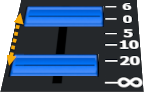
Click on "Select file..." and select the image you want to use for the background.
Please see the documentation for guidelines on how to create your own background image.
Please note that any image or text you define in the Stream Deck Editor's default fields always takes precedence.
- If you want to have a graphic view of the fader state you must not select any icon in the normal icon selection in the editor - if you do, that image will always be displayed no matter what the plugin is trying to display.
- If you want to have the fader value displayed you must not set any text in the Title field in the editor - if you do, that title will always be displayed no matter what the plugin is trying to display.